Inventory & profit tracking for resellers

Know what your next flip really earns.

Keep the purchase, sale, fees, and other costs together. Upcyclist shows the profit from the numbers you enter — and makes missing costs easy to spot and fix.

14 days. All Pro features. Credit card required. Cancel before the trial ends to avoid a charge.

Entered fees, tax, and costs stay visible Exports and reports included 14 days free, card required
ROI
+130.7%
Net Profit
+$1,057
Upcyclist overview dashboard with Example data
Upcyclist overview on a phone with Example data
The numbers

A profit number you can check.

A selling price is only the start. Upcyclist keeps the entered purchase cost, fees, tax, shipping, and other costs visible so you can understand — and correct — the result.

Profit from entered data · Example data
+$6.57
Sold for$17.00
Purchase cost−$7.03
Marketplace fees−$3.40
Margin48.3%
Cost check incomplete: sales tax is entered, shipping is not. Add it before treating this result as final.
Product

The trail behind every sale.

Real product screens for the work between finding an item and knowing what it earned.

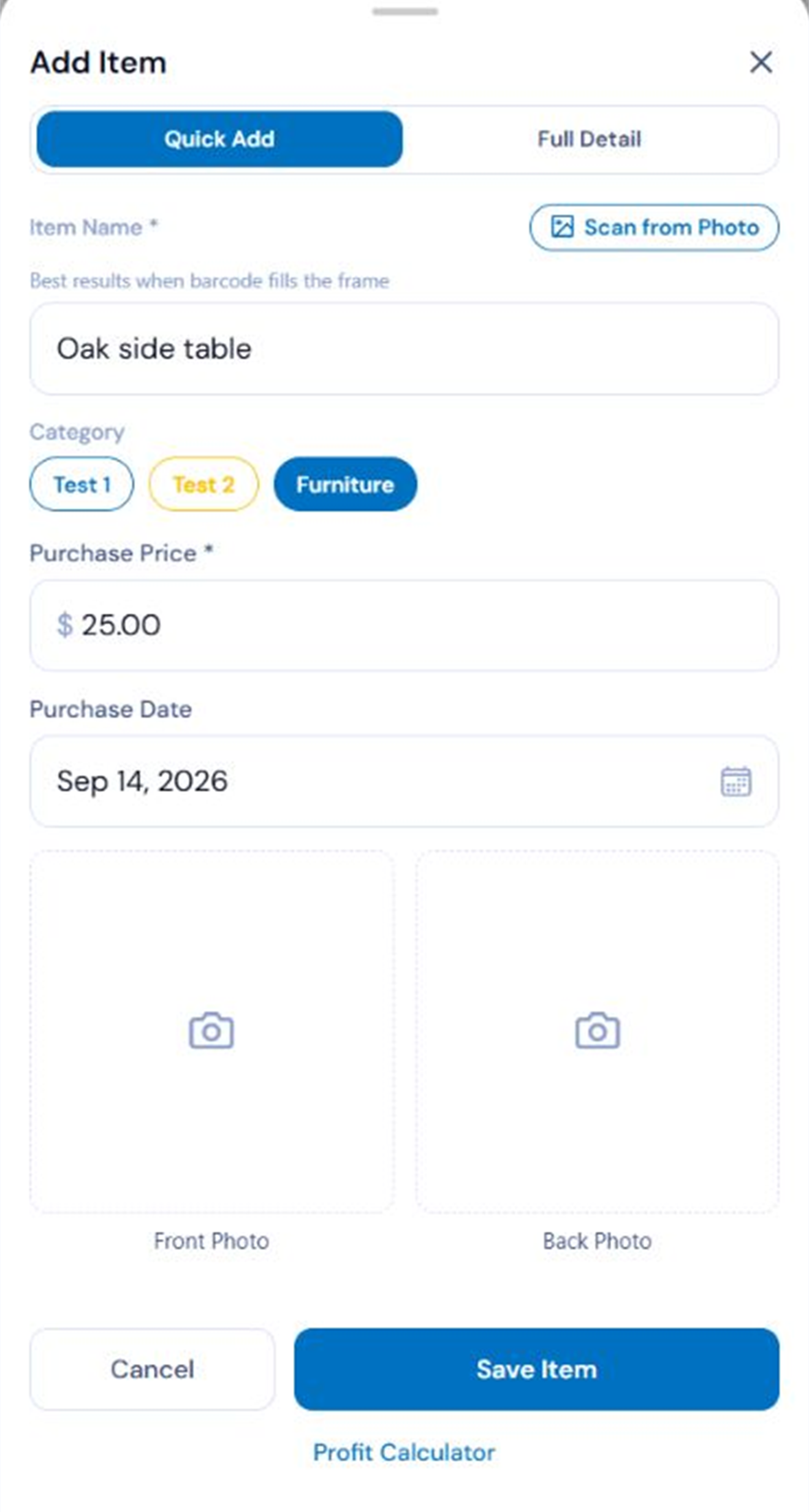
Start with the item in front of you

Add the purchase first, then keep its listing, sale, and entered costs connected as the story develops.

  • Purchase-to-sale item history
  • Optional details can wait
  • Example data shown in the capture
Quick add screen with Example data
Features

Useful at the pile, the listing desk, and the sale.

Purchase info stays attached

Keep the cost, source, quantity, and optional details with the item instead of rebuilding them later.

Aging without another formula

Purchase dates and item status make it easier to see what has been sitting.

Planning from completed sales

Planning Insights separates Top Sellers from Best Margins after at least 10 distinct sold item names. It summarizes history; it does not predict.

Records ready when needed

The trial and paid Pro include CSV, QuickBooks, and PDF reporting exports. Upcyclist organizes your entries but does not provide tax or accounting advice.

Pricing

See what your next flip earns. Try Pro free for 14 days.

Try the complete app for 14 days. Record a purchase, log a completed sale, and see what you earned. Choose a plan and add your card to begin. Cancel before the trial ends to avoid a charge.

14-day Pro trial

The complete app, starting after card setup in Stripe.

$0

For 14 days. Credit card required. Cancel before the trial ends to avoid a charge.

  • Unlimited inventory, sales, buyers, and expenses
  • All supported sales platforms and FIFO lot grouping
  • Two photos per item: front and back
  • CSV import, CSV and QuickBooks export
  • Full profit history and PDF reports
Start free trial
Renews after the trial unless canceled Credit card required Cancel anytime
Features14-day trialPaid Pro
Active inventory itemsUnlimitedUnlimited
Expense entries / moUnlimitedUnlimited
Devices & syncAll devicesAll devices
Profit analyticsFull historyFull history
CSV importUnlimitedUnlimited
CSV and QuickBooks exportIncludedIncluded
PDF reportsIncludedIncluded
Photos per item2 (front/back)2 (front/back)
FIFO lot groupingIncludedIncluded

Choose monthly ($9.99) or annual ($99) billing and add a credit card through Stripe to start 14 days of all Pro features. Creating an account alone does not start the trial. Your card is charged automatically when the trial ends unless you cancel beforehand. Stripe shows the first charge date and amount before confirmation. Cancel in Settings > Plan & Billing; access continues through the original trial deadline. When Pro access ends, you can still view, export, and delete your records.

Questions

Good to know

More detail in the full FAQ.

An active item is inventory you still own or are still selling. Fully sold and completed items do not continue to count; partially sold items remain active while units remain.
Choose monthly ($9.99) or annual ($99) billing and add a credit card through Stripe to start 14 days of all Pro features. Creating an account alone does not start the trial. Your card is charged automatically when the trial ends unless you cancel beforehand. Stripe shows the first charge date and amount before confirmation. Cancel in Settings > Plan & Billing; access continues through the original trial deadline. When Pro access ends, you can still view, export, and delete your records.
Payment is due immediately. Your paid plan begins then and replaces any remaining trial days.
Yes. Your trial and paid Pro include CSV import for inventory, sales, buyers, and expenses, with no plan-based row cap. Import is unavailable after the trial until you subscribe.
Yes. CSV, QuickBooks, and PDF exports are included during the trial and remain available after it ends. Use Settings to export your records.
You keep Pro through the paid period. After it ends, existing records remain visible, but the account becomes read-only until you resubscribe; deleting records is still allowed.
Open Settings, choose Data & Export, then use Delete my account in the Danger zone. Deletion permanently removes the account and its associated data, so export first if you need a copy.
No. Upcyclist organizes the records you enter and can make preparation easier, but it does not provide tax or accounting advice. Consult a qualified professional for your situation.
Upcyclist is an independent tracking tool. It records the marketplace and sale details you enter; it does not imply crosslisting, automatic imports, two-way sync, or marketplace affiliation.
Planning Insights summarizes completed sales after at least 10 distinct item names. Top Sellers ranks units sold and Best Margins ranks calculated margins; it summarizes history, does not predict future sales, and excludes names with no entered cost from Best Margins.
Ready when you are

Find out what your next flip earns.

Add your first item and keep the purchase, sale, and costs connected from the start.

Start free trial